
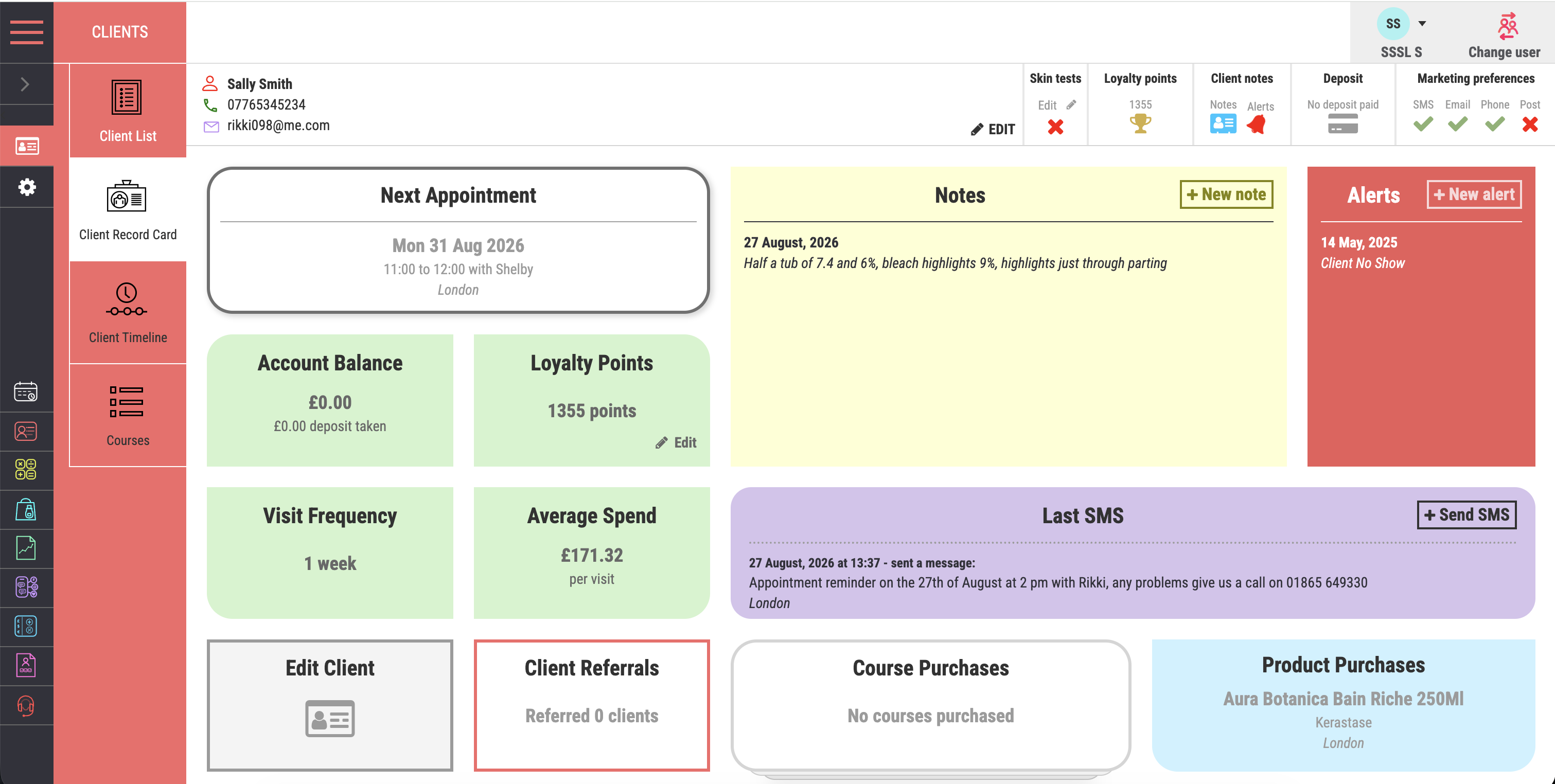
Salon CRM, Client Records and Loyalty

Salon CRM Software That Helps Every Client Feel Remembered

Salon crm and client records keeps appointment history, preferences, notes, purchases, courses and vouchers together. Salon Manager links the client timeline with booking, consultation, marketing and checkout. This helps salons that want more personal and prepared client service help the team recognise context and manage individual booking preferences. The wider cloud platform connects appointments, online booking, payments and client records. It also brings together marketing, stock and reporting. Salon Manager is backed by more than 30 years of specialist industry experience. Published packages start from £29 plus VAT per month. UK-based onboarding, training and support are available.

A direct answer for salon owners

What Is Salon CRM Software and What Should It Connect?

Salon CRM software brings useful client information into one working record. Salon Manager connects contact details, consultations, formulas, preferences and visit history. It also links communication, loyalty and rebooking so authorised team members can see what matters next.

The product, provider and client workflow

How Salon Manager CRM Fits Into the Wider Platform

Salon Manager is the salon management platform supplied by Salon Software Solutions Limited. The CRM connects client information with appointments, consultations and communication. It also links loyalty, checkout and reporting instead of acting as a separate address book.

What it is

A Working Client Record

It combines useful client context with the daily actions that create and use that information.

Who supplies it

Salon Software Solutions Limited

The company is active at Companies House under number 08930241. It was incorporated in 2014.

What it should connect

Booking to Rebooking

The value comes from carrying appropriate context through the client journey. More fields do not automatically create more value.

How to judge it

Test the Handoffs

Check whether the right information remains clear at every handoff. Follow it from reception to service, checkout and follow up.

A useful buying principle: Do not judge salon CRM software by the number of fields it can store. Judge whether the right context appears at the next decision. The team should not need duplicate entry, private paper notes or separate systems.

Explore the Connected PlatformSee Online BookingSee Connected Checkout

The practical tools behind client continuity

Use Client Information to Improve Every Visit and Every Follow Up

Keep relevant client context available where the team works. Avoid paper notes, separate spreadsheets and disconnected message lists.

Know the client before they sit down

Give the Team the Full Client Story

Keep contact details, preferences, notes and formulas together. Visit history and communication remain ready when the team needs them.

Keep appointments clear and visible

Make Each Appointment Easier to Remember

Send confirmations and reminders before the visit. Use follow ups and rebooking prompts when they are relevant.

Turn satisfaction into a clear next step

Make Rebooking Part of the Client Journey

Prompt the next appointment while the service and recommended return interval are still clear. This supports forward diary visibility and a more consistent client routine.

Use context rather than guesswork

Make Recommendations That Fit the Client

Use recorded preferences, previous visits and outcomes to guide recommendations. Service, treatment and retail suggestions can then feel more relevant.

Recognise the clients who keep coming back

Reward Loyalty Without Losing the Client Context

Connect loyalty rewards, vouchers, packages and relevant offers to the client record. Recognition can then continue beyond one visit.

Useful access with the right controls

Keep Useful Client Context Available to Authorised Teams

Give authorised team members access to current client information across supported devices and locations. Use permissions to control who can view or change sensitive information.

A continuous client journey, not isolated appointments

Carry the Right Client Context From Booking to Rebooking

Use the same connected record before, during and after the visit. The next team member should not need the client to repeat known information. Useful context should already be clear.

Before they arrive

Confirm the Visit and Prepare With Context

Send the right confirmation and reminder. Review previous notes so the team is ready before the client arrives.

While they are with you

Deliver a Service That Remembers the Details

Bring preferences, formulas, history and consultation information into the conversation and the service.

Before they leave

Recommend, Reward and Secure the Next Step

Recommend suitable retail, apply loyalty rewards and make the next appointment easier to secure.

Between appointments

Stay Relevant Without Becoming Noise

Use follow ups, birthday messages, relevant offers and rebooking reminders to keep the relationship active.

A practical test for a live demo

The Five-Minute Client Record Continuity Test

Use one realistic client journey for the test. Check whether useful information follows the client through the business. The test focuses on continuity, relevance and control rather than a long feature checklist.

Step 1

Open one realistic client record

Check whether contact details, preferences, consultations, formulas, history and communication are easy to understand.

Step 2

Prepare the next visit from context

Ask a team member to identify what matters for the next appointment. They should not need memory or separate notes.

Step 3

Check data relevance and access

Confirm the record holds what the business needs. Permissions should limit access to the appropriate people.

Step 4

Follow the record through checkout

Check that recommendations, loyalty activity and vouchers stay connected. The completed visit should remain on the same client record.

Step 5

Create the next useful action

Rebook, schedule an appropriate reminder or record a follow up. Confirm the next user can see why it exists.

Pass condition: complete all five steps without duplicate entry or hidden paper notes. Access and permitted use should also be clear.

Service messages and marketing need different controls

Send Useful Messages Without Treating Every Client the Same

Use relevant client information to support appointment messages, follow ups and rebooking. Marketing messages must follow the rules that apply to the business. These may cover consent, soft opt-in and opt-out.

Clear appointment confirmationsMake the date, time, service and booking details clear from the start.
Reminders that protect the diaryGive clients a timely prompt and a clear chance to act if their plans have changed.
Prompts that support better rebookingEncourage clients to return at the interval that works best for their service.
Relevant messages based on appropriate dataUse suitable client information to shape relevant communication, while collecting only the data the business actually needs.

Make loyalty part of a useful client record

Make Loyalty Easy to Understand, Earn and Redeem

Connect personalised service with rewards, vouchers, packages and timely communication. Clients can see a clearer reason to return. The team keeps the activity in context.

Loyalty clients can see and use

Track and redeem loyalty activity through the connected client record and checkout.

Gift vouchers that bring new visits forward

Support gifting, future bookings and new client acquisition with connected voucher management.

Packages that support longer relationships

Make repeat treatments easier to manage. Longer term client commitments can also stay clearer for the team and client.

Offers built around real client relevance

Shape promotions around suitable client history, interests and behaviour. Avoid sending the same message to everyone.

Useful information with responsible controls

Keep Client Records Useful, Relevant and Properly Controlled

Salon Manager keeps client information in its cloud-based platform. Authorised teams can access it across supported devices and locations. Businesses remain responsible for deciding what data they need and who should access it. They must also decide how it is used and retained.

Cloud-based access for authorised users
Current records where the team works
Access across supported devices
Connected context across locations
Permissions for controlled access

Independent context for client records and communication

Useful CRM Depends on Relevance, Clear Communication and Responsible Data Use

The sources below support good operating principles. They do not prove a guaranteed commercial result for any salon or software platform.

Entity evidence

A Verifiable UK Company Record

Companies House lists Salon Software Solutions Limited as active under company number 08930241. It was incorporated on 10 March 2014.

Check the Companies House record

Data quality principle

Collect What Is Relevant, Not Everything Possible

ICO guidance says personal data should be adequate and relevant. It should also be limited to what the stated purpose requires.

Read the ICO data minimisation guidance

Marketing communication

Consent, Soft Opt-In and Opt-Out Still Matter

ICO guidance explains the rules for marketing by email and text. These include consent or the existing-customer soft opt-in, plus a simple opt-out.

Read the ICO electronic marketing guidance

Reminder evidence

Message Content Can Affect Attendance Behaviour

A UK hospital trial tested different reminder wording. The strongest version reduced missed appointments by 23% compared with the standard message. This healthcare finding is useful context, not a salon result guarantee.

Read the GOV.UK reminder study summary

Security principle

Access Controls Are Part of Responsible CRM

ICO guidance calls for appropriate technical and organisational measures. These should protect personal data from unauthorised access, loss or damage.

Read the ICO security principle

Compliance note: This page describes product capabilities and general operating principles. It is not legal advice. Each business remains responsible for its lawful basis, privacy information and consent records. Retention, marketing rules and staff access also need attention.

Make client continuity visible in a live demo

Give Every Client a More Connected Experience

See how Salon Manager connects records, consultations, reminders and rebooking. Loyalty, communication and access controls stay part of the same journey.

See Client Loyalty in Action
Talk to the UK Team
Call 01865 649330

Key facts at a glance

What should you know about salon CRM and client records?

Salon Manager has more than 30 years of specialist industry experience. Its published software packages start from £29 plus VAT per month.

Question Direct answer
What is salon CRM and client records?

Salon crm and client records keeps appointment history, preferences, notes, purchases, courses and vouchers together.

How does Salon Manager support it?

Salon Manager links the client timeline with booking, consultation, marketing and checkout.

Who is this information for?

It is designed for salons that want more personal and prepared client service.

What published Salon Manager facts provide context?

Salon Manager has more than 30 years of specialist industry experience. Published software packages start from £29 plus VAT per month.

A practical four-step process

How do you put salon CRM and client records into practice?

  1. 1. Map the current workflowDocument how the team currently handles the work covered by salon CRM and client records.
  2. 2. Configure the rulesSet services, permissions, policies and communication around the way the business actually operates.
  3. 3. Test a complete journeyFollow one realistic client or team journey from the first action through to reporting.
  4. 4. Train and improveGive each role practical training, monitor results and refine the setup when requirements change.

Frequently asked questions

What do people ask about salon CRM and client records?

What is salon CRM and client records?

Salon crm and client records keeps appointment history, preferences, notes, purchases, courses and vouchers together.

How does Salon Manager handle salon CRM and client records?

Salon Manager links the client timeline with booking, consultation, marketing and checkout. This helps help the team recognise context and manage individual booking preferences.

Who benefits from salon CRM and client records?

The page is written for salons that want more personal and prepared client service.

Does salon CRM and client records connect with other Salon Manager tools?

Yes. Relevant activity can connect with appointments, online booking, client records, payments, marketing, stock or reporting, depending on the workflow and package selected.

How do I get started with salon CRM and client records?

Start by reviewing the current process and required outcomes. A Salon Manager demonstration can then show the relevant workflow, configuration, onboarding and training options.

© 2026 Salon Software Solutions Ltd

Website by Yello